Native on both platforms
Each edition is written for its own platform, so windows, menus, and shortcuts follow the conventions you already know.

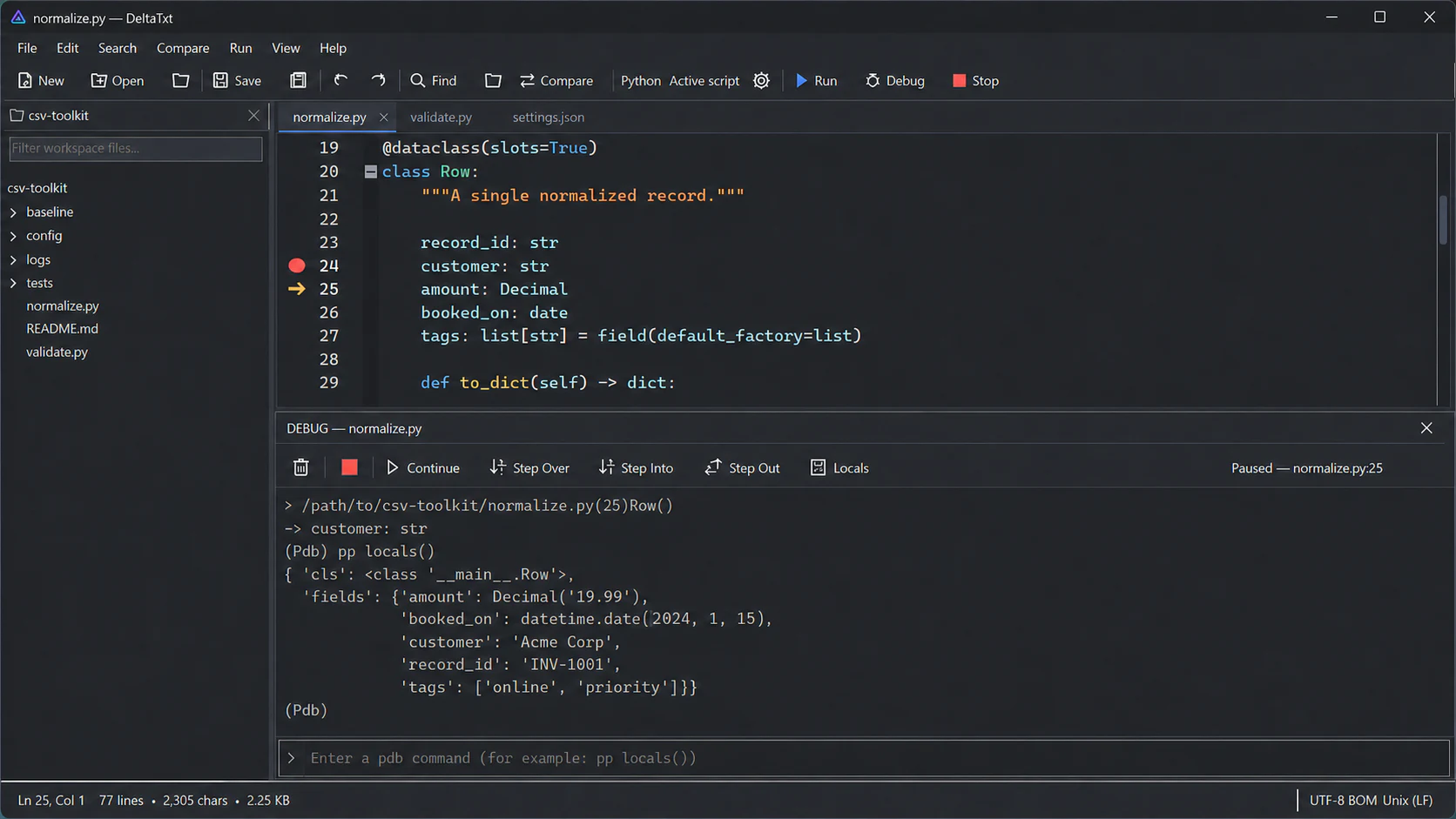
Set breakpoints, step through code, and inspect locals in a fast native Windows app. No Electron, no web wrapper.
Mac + Windows · Freeware
Each edition is written for its own platform, so windows, menus, and shortcuts follow the conventions you already know.
Run and debug scripts with breakpoints, stepping, and Locals, plus direct pdb commands in the docked output panel.
Search by plain text or regular expression with case and whole-word controls, then replace only the matches you intend.
Find a value across code, configs, and logs, then preview broader replacements and keep a backup.
Stream find and replace through logs and exports without holding the whole file in memory.
Review versions side by side, apply individual changes, and build a three-way merge draft without overwriting the inputs.
Syntax highlighting for dozens of languages, with code folding, a function list, and a scrollable minimap.
Column selection, bookmarks, auto-indent, matching-brace highlighting, and Go to Line.
Compare two folders side by side, then sync the differences with a preview and optional backups.
Detects and preserves UTF-8, UTF-16, UTF-32, BOM, and CRLF, LF, or CR line endings, so nothing is silently rewritten.
Atomic writes with optional backups, crash recovery, and session restore that reopens your tabs.
Freeware with no account, no telemetry, and no ads. Your files stay on your machine.
Swift + AppKit. Native windows, menus, shortcuts, and document behavior. New in 0.3.3: Markdown preview, snippets, macros, Follow File for live logs, and JSON and XML formatting.
C# + .NET 8. Windows Forms, Scintilla, Explorer integration, and Python debugging.
Yes. DeltaTxt for Mac is built natively in Swift with AppKit. It is not an Electron app or a wrapped website.
Yes, in the Windows edition. Set breakpoints, then Continue, Step Over, Step Into, or Step Out while reviewing the current line, printing Locals, and entering direct pdb commands in the docked output panel. The Mac App Store edition focuses on editing and text tools and does not run or debug scripts — the App Sandbox it ships under cannot launch an interpreter.
Use case-sensitive, whole-word, or regular-expression search in one document or across a workspace. For workspace replacement, DeltaTxt builds a preview, revalidates files before applying changes, and keeps a backup tree.
Yes. DeltaTxt is freeware with no subscription, account, advertising, or paid tier required.
No. DeltaTxt does not include telemetry, analytics, advertising, or automatic crash submission.
On Windows, user-selected scripts and interpreters run with your operating-system permissions. Review scripts and their dependencies before running them. The Mac App Store edition does not run scripts.
The Mac user guide covers every menu and preference. For a specific problem, visit DeltaTxt support or email support@shrpware.com.